


This is a very old effect that was used in the software rendering demos of the 90s. It's a nice one, cause despite its simplicity, it generates images that look interesting. You have probably seen the effect in the real world, when you take a video camera and you use is to record your room, and you take the output video signal and you plug it to your tv set. Then, of course, you see on the tv whatever you are shooting to. Now, if you point your camera towards the tv screen, you get the tv being displayed in itself. Because there is a little delay on the video signal going from the camera to the tv, what you see is an "infinte" sequence of images. If you start moving the camera, and turning it, you will see all sort of spirals in your television.
There is a very simple way to make such a thing as a demo effect, and it's cheap, small and fast, that's why it was used often. Today, with OpenGL and such APIs for graphisc, it's even easier, and the quality is much better too due to the high quality mipmap and bilinear interpolation texture fetches that we have for free. Also, the implementation of this effect doesn't need shaders or anything, we just need to be able to render to a texture. So, even the old OpenGL 1.1 can do it. In fact you can download the following executable and watch the effect yourself in your own ancient computer.
There is a very simple way to make such a thing as a demo effect, and it's cheap, small and fast, that's why it was used often. Today, with OpenGL and such APIs for graphisc, it's even easier, and the quality is much better too due to the high quality mipmap and bilinear interpolation texture fetches that we have for free. Also, the implementation of this effect doesn't need shaders or anything, we just need to be able to render to a texture. So, even the old OpenGL 1.1 can do it. In fact you can download the following executable and watch the effect yourself in your own ancient computer.
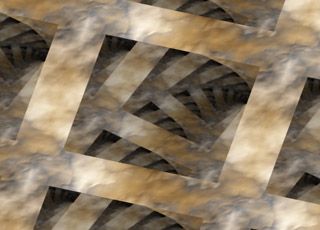
The effect - a rotating texture with feedback
void renderQuad( float time, int tid )
{
const float s = 0.8f + 0.3f*sinf(0.2f*time);
const float a = 0.4f*time;
glEnable( GL_TEXTURE_2D );
glBindTexture( GL_TEXTURE_2D, tid );
glBegin( GL_QUADS );
glTexCoord2f( 0.5f + s*cosf(a + 0.0000f), 0.5f + s*sinf(a + 0.0000f) ); glVertex2i( -1, 1 );
glTexCoord2f( 0.5f + s*cosf(a + 1.5708f), 0.5f + s*sinf(a + 1.5708f) ); glVertex2i( -1, -1 );
glTexCoord2f( 0.5f + s*cosf(a + 3.1416f), 0.5f + s*sinf(a + 3.1416f) ); glVertex2i( 1, -1 );
glTexCoord2f( 0.5f + s*cosf(a + 2.3562f), 0.5f + s*sinf(a + 2.3562f) ); glVertex2i( 1, 1 );
glEnd();
glBindTexture( GL_TEXTURE_2D, 0 );
glDisable( GL_TEXTURE_2D );
}
Good, believe it or not, we are almost done with the effect :) Now we need to introduce the feedback. To do so, what we are going to do is to take the buffer we just rendered with renderQuad() and copy it back to the texture we are using. But we are not going to completely overwrite it, we will just update a part of the texture, like for example the center part. We will keep few pixels non updated on the border, just like when you film your television you camera is not fullscreen capturing the screen of the tv (the screen only covers part of the viewport). We can use the glCopyTexSubImage2D() for that, or we can use FBO (frame buffers objects). But let's do it in the old way, with glCopyTexSubImage2D():
void copyTexture( int textureSize, int border, int tid )
{
glBindTexture( GL_TEXTURE_2D, tid );
glCopyTexSubImage2D( GL_TEXTURE_2D, 0, border, border, 0, 0, textureSize-2*border, textureSize-2*border );
glBindTexture( GL_TEXTURE_2D, 0 );
}
The first argument is the size of the texture we are using, for example 512, and the second one, border, is the amount of pixels we are going to keep free of feedback, for example, 64.
Now we are ready to build the complete effect:
void renderFeedBackEffect( const MyEffect *ffx, float time, int xres, int yres )
{
// render a rotated and scaled version of the texture
glViewport( 0, 0, ffx->mTextureSize, ffx->mTextureSize );
glTexEnvi( GL_TEXTURE_ENV, GL_TEXTURE_ENV_MODE, GL_MODULATE );
glColor3f( 0.75f, 0.75f, 0.75f );
renderQuad( time, ffx->mTextureID );
// feedback
copyTexture( ffx->mTextureSize, 64, ffx->mTextureID );
// display the texture on screen
glViewport( 0, 0, xres, yres );
glTexEnvi( GL_TEXTURE_ENV, GL_TEXTURE_ENV_MODE, GL_REPLACE );
renderQuad( time, ffx->mTextureID );
}
The glColor3f() command is used so that each copy of the image in the feedback loop get's attenuated. That makes the old copies of the image fade to black slowly as they get older (look the sample image on the top right of this page, note how the spirals go to dark). The glTexEnvi() is used to ensure this color modulation happens in the right momments. Of course, xres and yres are the screen resolutions, and time is the current time for the frame (in seconds normaly).
Of course, do not forget to set the projection and modelview matrices to identity (no need for glOrtho() or anything), and disable depth tests.